Notify subcontractors when a job date moves
Buildertrend's calendar sync runs on a lag, and it sends nothing to a subcontractor when their date changes. Clickr watches your Schedules dataset and sends the calendar invite itself, within minutes.
Free for 3 months · $80/month after that
Schedule
Thompson Residence · Lot 24
Synced 2m ago
MON 14
TUE 15
WED 16
THU 17
FRI 18
Site clear
Delgado Excavating
Excavation
Delgado Excavating
Footings
Ruiz Concrete
Slab pour
Ruiz Concrete
Waiting for the next change
Schedules · resync every 10 min
Native Buildertrend
Buildertrend records the change and stops there
Today
You move “Excavation” out by a day. Buildertrend records it, but sends no dispatch notification to the assigned subcontractor, and its calendar sync can take hours to catch up. Either someone on your team calls around, or a crew turns up on the old date.
With Clickr
The change reaches your Schedules dataset within 10 minutes. Clickr looks the item back up in Buildertrend for its current dates and assignee, resolves that person’s email, and sends a calendar invite that lands as a calendar entry rather than another email to miss.
≤10 min
For the change to reach your data
Minutes
Until the invite is in their calendar
0
Lines of code you write
What it looks like
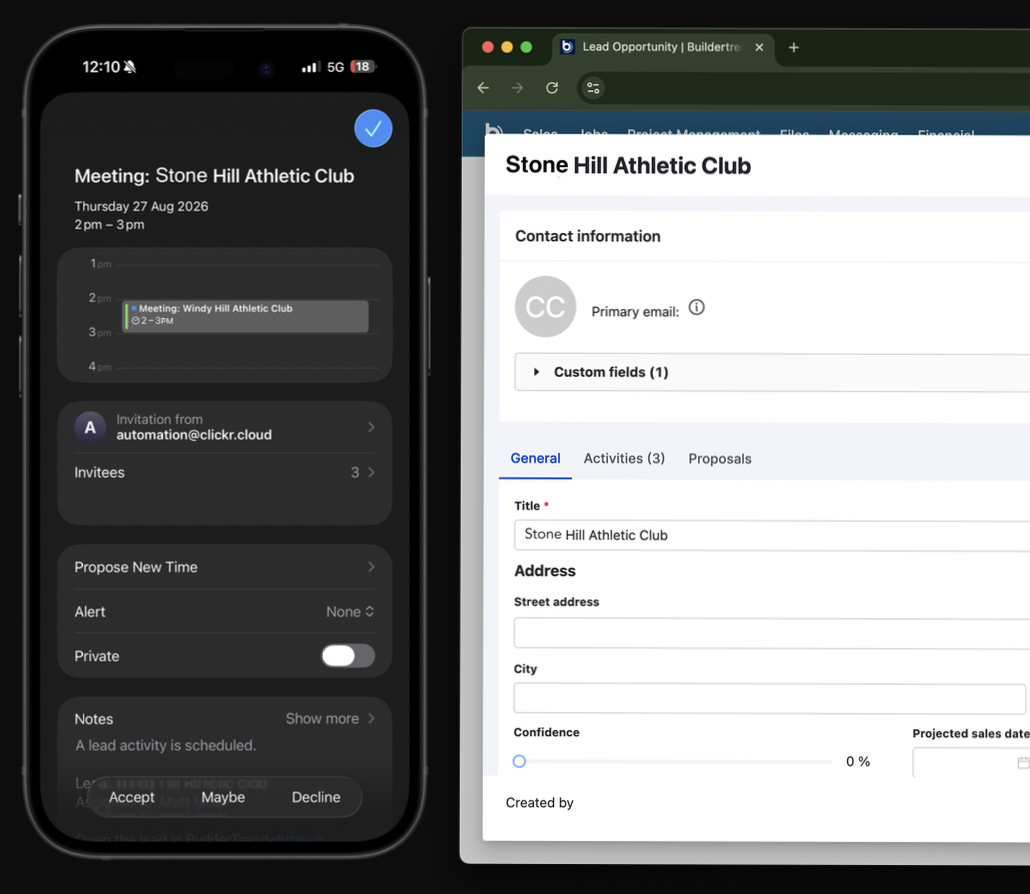
A calendar invite, from your address, on their phone
The invite carries the job name, the schedule item and the new dates, and behaves like any other meeting rather than a notification inside a portal. Subcontractors can accept it, and it updates itself if you move the date again.
All-day items stay all-day. Hourly items carry their real times and time zone.
Questions
No, it runs alongside them. Buildertrend continues to send its own notifications, and this adds a calendar invite to the assigned subcontractor within minutes of a date changing.
More on Buildertrend
Other ways to use the Schedules dataset
The same dataset behind these invites is readable from a spreadsheet, the REST API or your AI assistant, with nothing extra to connect and no second subscription.
Every dataset on the connector, every way to reach them, and what it costs.
A REST endpoint over your synced Buildertrend records, with bearer token auth and JSON responses.
Send schedules, tasks and jobs into Google Sheets, Excel, Power BI or your own warehouse.
Connect Claude, ChatGPT or Cursor to your synced records and ask questions in plain English.
Prompts to try on a sample builder with no sign-in, and how to connect your own Buildertrend.
Connect Buildertrend
and pick a dataset
The first three months are free and your backfill is included. Sign in with the account you already have, choose a dataset, and your records are queryable in about 10 minutes.
or email support@clickr.cloud with a question first